CPU vs GPU vs TPU: Which AI Accelerator Is Right for You?
Key Takeaways
CPU Versatility for Foundational Tasks: CPUs excel in sequential processing, making them ideal for data preprocessing, traditional machine learning models, initial prototyping, and low-latency single inference, but they struggle with the parallel demands of deep learning training.
GPU Power for Parallel Workloads: Originally designed for graphics rendering and gaming, GPUs provide massive parallelism through thousands of cores, accelerating deep learning training for models like CNNs and Transformers, though they consume high power and are less efficient for sequential or low-batch tasks.
TPU Efficiency for Hyperscale AI: TPUs, custom ASICs from Google, optimize matrix multiplications for large-scale model training and inference, offering superior performance-per-watt in cloud environments, but lack flexibility for non-matrix-dominated workloads.
Choosing the Right Accelerator: The optimal hardware depends on workload specifics—CPUs for flexibility, GPUs for throughput in parallel processing tasks, and TPUs for cost-effective, massive-scale operations—impacting project speed, cost, and scalability.
Emerging Trends in AI Hardware: Beyond the big three, NPUs enable efficient AI processing on edge devices, DPUs offload data center infrastructure, and hybrid architectures from companies like Amazon and Meta signal a shift toward specialized, vendor-independent solutions.
At Allied VC, we've evaluated hundreds of AI startups, and hardware decisions are consistently one of the top technical risks we assess.
Navigating the AI & ML Accelerator Landscape
The artificial intelligence revolution is not powered by abstract algorithms alone. It runs on silicon. Behind every language model that generates human-like text, every image recognition system that identifies objects in a photo, and every scientific breakthrough accelerated by computation, there is a physical processing unit doing the heavy lifting. The performance, cost, and scalability of any artificial intelligence (AI) or machine learning (ML) project are fundamentally tied to the hardware it runs on. This makes the choice of processing hardware—the engine of AI—one of the most critical strategic decisions a team can make.
The Explosion of AI and the Need for Specialized Processing Units
For decades, the Central Processing Unit (CPU) was the undisputed king of computing, a versatile jack-of-all-trades capable of handling everything from running an operating system to balancing a spreadsheet. However, the rise of deep learning and massive neural network models created computational demands that the general-purpose CPU was never designed to handle efficiently. The core operations in modern machine learning, primarily vast matrix multiplications, required a new approach. This demand sparked an evolution in hardware, leading to the adaptation of Graphics Processing Units (GPUs) and the invention of entirely new architectures like the Tensor Processing Unit (TPU).
Why Choosing the Right Accelerator Matters for Your Project
Selecting the right hardware is not merely a technical detail; it is a core component of your project's strategy. An incorrect choice can lead to cripplingly slow training times, inflated cloud computing bills, and an inability to scale. Conversely, the right accelerator can dramatically shorten development cycles, unlock new capabilities, and provide a significant competitive advantage. This decision impacts everything from initial R&D to the final deployment and operational cost of your AI application. In the AI era, compute is not a commodity—it's a strategic weapon.
What This Guide Will Cover: Understanding Your Options
This guide will demystify the three primary types of processing units at the heart of the AI boom: the CPU, the GPU, and the TPU. We will explore the architecture, strengths, and weaknesses of each. By the end, you will have a clear framework for understanding which accelerator is best suited for your specific machine learning workloads, whether you are training a massive deep learning model in the cloud or deploying a lightweight inference model on an edge device.
The Foundation: Central Processing Unit (CPU)
The CPU is the original brain of the computer, a masterpiece of engineering designed for flexibility and logical precision. It's the component that runs your operating system, browser, and most of the software you use daily.
What is a CPU? (Central Processing Unit)
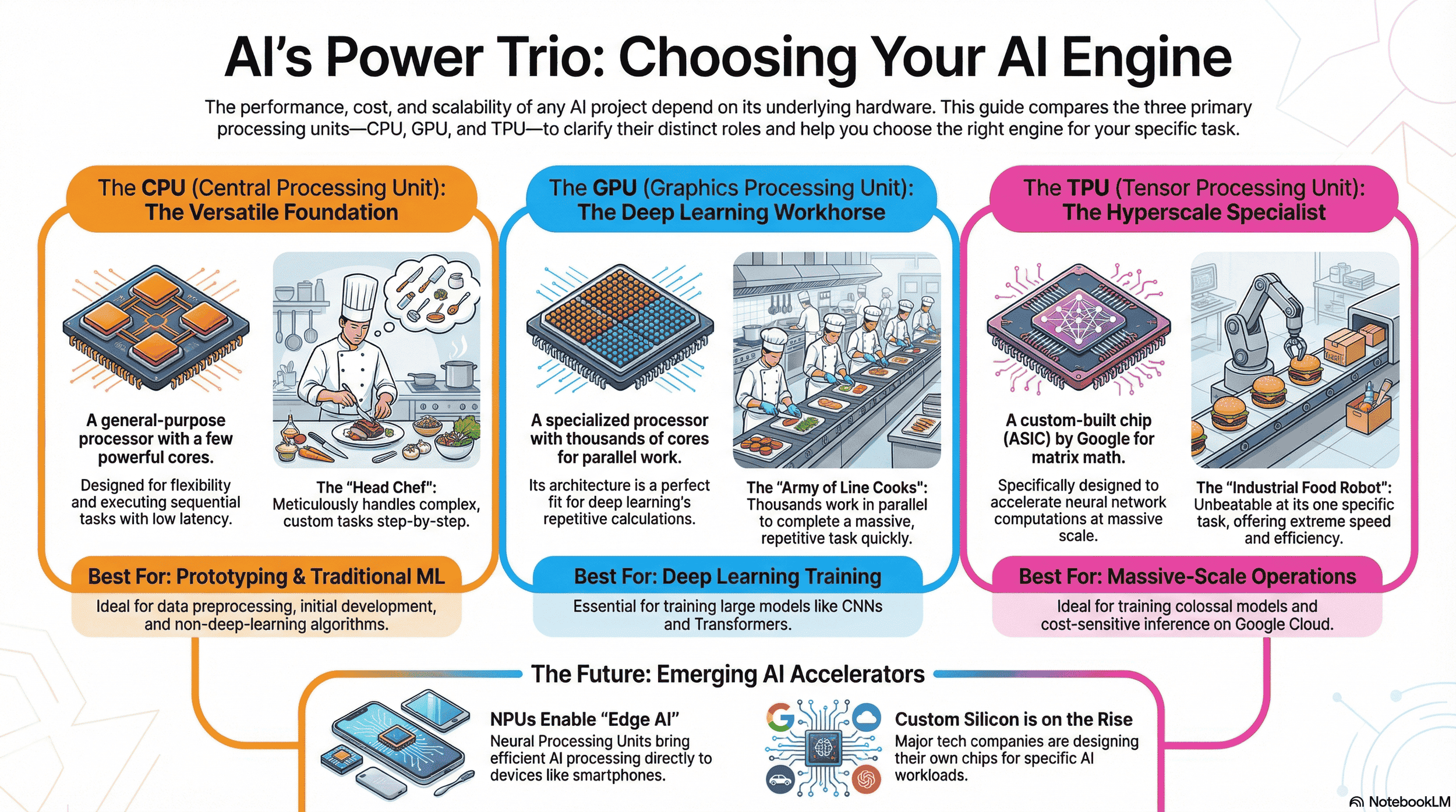
A Central Processing Unit is a general-purpose processor built with a few powerful cores, typically ranging from 4 to 64 (source: ApX). These cores are designed to execute a wide variety of tasks one after another (serially) at very high speeds. Think of a CPU as a highly skilled head chef in a kitchen. This chef can handle any complex, custom order that comes in, meticulously executing each step of the recipe in perfect sequence. They are brilliant at task-switching and managing the entire kitchen's workflow.
CPU Architecture: Sequential Processing Power
The primary architectural strength of a CPU lies in its ability to handle complex control flow and execute instructions with very low latency. Each core is an independent powerhouse, equipped with large caches and sophisticated logic units for branch prediction and out-of-order execution. This design makes it exceptional at tasks that are inherently sequential, where the result of one step is required before the next can begin. Its versatility is its greatest asset, allowing it to perform a vast range of computational tasks effectively.
Strengths in AI & ML Context
Within machine learning projects, CPUs remain indispensable. They excel at the "scaffolding" tasks around the core model training. This includes data preprocessing, where complex data transformations and feature engineering often involve sequential logic that doesn't lend itself to parallelization. CPUs are also excellent for running traditional ML algorithms like linear regression, support vector machines, or decision trees that are not as computationally intensive as deep learning. Their low latency makes them suitable for single, real-time inference tasks where a quick response to one input is critical.
Weaknesses for Machine Learning Workloads
The CPU's strength in sequential processing becomes its primary weakness for deep learning. A neural network is trained by performing millions or billions of identical, simple mathematical operations (like matrix multiplication) simultaneously (source: Google). The CPU, with its handful of powerful cores, is like a head chef trying to chop 10,000 onions one at a time. It’s highly skilled but fundamentally inefficient for this type of massively repetitive, parallel task. This bottleneck leads to extremely long training times for any non-trivial deep learning model.
When to Use a CPU for AI & ML
Despite its limitations for training, a CPU is the right choice for several scenarios:
Initial Development & Prototyping: For small-scale experiments and debugging code, the simplicity and universal availability of CPUs make them ideal.
Data Preprocessing: When your pipeline involves complex data manipulation, string operations, or custom logic before feeding data into a model.
Traditional ML Models: For algorithms that do not rely on deep neural networks, a CPU often provides the best performance-per-dollar.
Low-Latency Inference: When your application needs to process single inference requests with the fastest possible response time.
The Workhorse of Deep Learning: Graphics Processing Unit (GPU)
Originally designed to render the complex 3D graphics of video games, the Graphics Processing Unit has become the de facto workhorse for the deep learning revolution, a testament to its unique architectural design.
What is a GPU? (Graphics Processing Unit)
A Graphics Processing Unit is a specialized processor composed of thousands of smaller, more efficient cores designed to handle multiple tasks simultaneously. Continuing our kitchen analogy, if the CPU is the head chef, the GPU is an army of line cooks. Each line cook isn't as skilled or versatile as the head chef, but you can give them all the same simple, repetitive task—like chopping onions—and they can accomplish it in a fraction of the time by working in parallel.
From Graphics to General-Purpose Computing: Evolution of the GPU
The turning point for GPUs in AI came in the early 2000s. Researchers realized that the mathematical operations required for rendering graphics—multiplying matrices to manipulate pixels and polygons—were fundamentally similar to the operations at the core of neural network processing (source: ScienceDirect). Companies like NVIDIA invested heavily in creating programming frameworks, most notably CUDA (Compute Unified Device Architecture), which allowed developers to unlock the massive parallel processing power of GPUs for general-purpose scientific and machine learning tasks. This move gave NVIDIA a decade-long head start and made the GPU synonymous with AI training.
GPU Architecture: Massively Parallel Processing
The key architectural feature of a GPU is its Single Instruction, Multiple Data (SIMD) design. This means it can take a single instruction (e.g., "multiply and add") and execute it across thousands of cores on thousands of different pieces of data at the exact same time. This is the definition of parallel processing. For deep learning, where a model's weights are updated by performing the same calculations on huge batches of data, this architecture is a perfect fit (source: arXiv). The GPU’s thousands of cores can process an entire batch of data simultaneously, dramatically accelerating the training process.
Key Features and Technologies for AI
Modern GPUs designed for AI include several critical features. High-bandwidth memory (HBM) is essential for quickly feeding the thousands of cores with the vast amounts of data required by deep learning models (source: Wevolver). Additionally, specialized hardware cores, such as NVIDIA's Tensor Cores, are built specifically to accelerate the mixed-precision matrix multiplication and accumulation operations that are foundational to neural network training and inference, providing another significant leap in performance over general-purpose GPU cores.
Strengths for AI & ML Workloads
The GPU’s primary strength is its exceptional throughput for parallelizable machine learning workloads (source: Aethir). It excels at training deep learning models, particularly in domains like computer vision (Convolutional Neural Networks) and natural language processing (Transformers), where models can have billions of parameters (source: Qu, X. 2021). The massive parallelism allows for the processing of large mini-batches of data, which is crucial for efficient and stable model training (source: Jeremy Jordan). This makes GPUs the go-to hardware for researchers and engineers pushing the boundaries of AI.
Weaknesses of GPUs
While powerful, GPUs are not without weaknesses. They are less flexible than CPUs and can be inefficient for tasks that are inherently sequential or involve complex branching logic. Their high performance comes at the cost of significant power consumption and heat generation, which are major considerations in data center operations (source: Ampere). Furthermore, GPUs can have higher latency than CPUs for single-point inference tasks because they are optimized for throughput on large batches, not for the rapid processing of a single input.
When to Use a GPU for AI & ML
A GPU is the optimal choice for the most common and demanding AI tasks:
Deep Learning Model Training: This is the GPU's killer application. For training CNNs, Transformers, or any large neural network, a GPU is essential.
High-Throughput Inference: When you need to process a large number of inference requests in batches, such as analyzing a stream of images or documents.
Computer Graphics and Rendering: For AI applications that involve generating or manipulating complex visual data.
Large-Scale Data Parallelism: For any machine learning task that can be broken down into many identical, independent calculations.
The AI Specialist: Tensor Processing Unit (TPU)
As the scale of AI at companies like Google exploded, even GPUs began to show their limits in terms of efficiency and cost at hyperscale. This challenge led Google to design its own custom hardware from the ground up, specifically for one purpose: accelerating neural network computations. The result was the Tensor Processing Unit (source: The Chip Letter).
What is a TPU? (Tensor Processing Unit)
A Tensor Processing Unit is an application-specific integrated circuit (ASIC) custom-built by Google to accelerate machine learning workloads developed with its TensorFlow framework. A TPU is not a general-purpose processor; it is an AI specialist. In our kitchen analogy, the TPU is a hyper-efficient, industrial-grade food processing robot designed to do one thing—like perfectly dicing 100,000 onions an hour—with unparalleled speed and energy efficiency. It can't create a custom sauce or manage the kitchen, but for its one specific task, it is unbeatable.
Google's Innovation: Hardware Optimized for Neural Network Processing
Google's key insight was that the vast majority of computations in neural network processing are matrix operations. They designed the TPU with a large physical matrix multiplication unit, called a Systolic Array. This hardware can perform tens of thousands of multiplication and accumulation operations in a single clock cycle (source: Google). By building the core mathematical operation of deep learning directly into the silicon, Google created a processor that could achieve a higher level of performance and efficiency for these specific machine learning tasks than even the most powerful GPUs of its time.
TPU Architecture: Designed for Matrix Processing
The TPU's architecture is a radical departure from both CPUs and GPUs. It minimizes the overhead of instruction fetching and control flow, dedicating the vast majority of its silicon to the raw computational units of the Systolic Array. This design excels at handling the massive tensor operations common in deep learning models. TPUs are designed to be connected into large "pods" of hundreds or thousands of units, allowing for the distributed training of colossal models that would be impractical to train on any other type of hardware (source: Google).
Key Features and Cloud Availability
TPUs are known for their exceptional performance-per-watt, making them a cost-effective choice for large-scale, continuous training and inference jobs. They are primarily available through Google Cloud, which democratizes access to this powerful hardware. Developers can leverage TPUs without needing to own and operate the physical infrastructure, making them accessible for a wide range of machine learning projects. They are deeply integrated with the TensorFlow ecosystem and are increasingly supported by other frameworks like PyTorch and JAX.
Weaknesses of TPUs
The TPU's specialization is also its main weakness. It is far less flexible than a GPU. It performs poorly on workloads that are not dominated by matrix multiplication. Early versions required computations to be done with lower precision (e.g., 8-bit integers), which necessitated model adjustments. While modern TPUs are more flexible, they are still optimized for a narrower range of machine learning tasks than GPUs. Their dependency on the Google Cloud ecosystem can also be a limiting factor for organizations committed to multi-cloud or on-premise deployments.
When to Use a TPU for AI & ML
A TPU is the accelerator of choice for specific, high-demand scenarios:
Massive-Scale Model Training: When training models with hundreds of billions or trillions of parameters, TPU pods are often the only feasible option (source: Google).
Workloads Dominated by Matrix Multiplication: For models like large Transformers and CNNs where the bulk of the computation is matrix math.
Cost-Sensitive, High-Volume Inference: For applications that require running inference on a massive scale, the TPU's performance-per-watt can lead to significant cost savings.
Projects Deeply Integrated with Google Cloud: If your entire ML pipeline is already built on Google Cloud Platform, using TPUs is a natural and highly efficient choice.
Beyond the Big Three: Emerging AI Accelerators
While CPUs, GPUs, and TPUs dominate the data center, the demand for AI processing everywhere—from smartphones to cars to industrial sensors—is driving the creation of a new wave of specialized hardware.
Neural Processing Units (NPU): The Edge AI Advantage
A Neural Processing Unit (NPU) is a class of microprocessor designed to accelerate AI inference directly on a device, a concept known as "edge AI." NPUs are built into the System-on-a-Chip (SoC) of many modern smartphones, smart cameras, and IoT devices. Their primary design goals are extreme power efficiency and low-latency processing. Unlike a power-hungry GPU in a data center, an NPU can run a facial recognition or language translation model locally without needing to connect to the cloud, preserving privacy and enabling real-time responses.
Data Processing Units (DPU): Offloading Data Center Workloads
In modern data centers, CPUs are increasingly bogged down with managing networking, storage, and security tasks, stealing cycles away from running applications. A Data Processing Unit (DPU), also known as an Infrastructure Processing Unit (IPU), is an accelerator designed to offload these infrastructure tasks. By handling the data-centric workloads of the data center, DPUs free up valuable CPU and GPU resources to focus purely on their primary computational tasks, increasing the overall efficiency and performance of the entire system.
The Trend Towards Specialized and Hybrid Architectures
The era of a single dominant processing architecture is over. The future of AI hardware is a "multi-chip world." Companies like Amazon (Trainium/Inferentia), Meta (MTIA), and Microsoft (Athena) are all designing their own custom silicon to optimize for their specific machine learning workloads, driven by the need for greater efficiency, lower costs, and reduced dependency on a single vendor. The trend is clear: we are moving towards a hybrid model where systems intelligently leverage a combination of CPUs, GPUs, TPUs, NPUs, and other custom accelerators, each chosen for the specific task it performs best.
Summary: CPU vs GPU vs TPU – Understanding the Difference
Navigating the AI accelerator landscape requires moving beyond a simple "which is fastest" mentality. The optimal choice depends entirely on the specific needs of your machine learning project.
The CPU (Central Processing Unit) remains the versatile foundation, essential for sequential tasks, data preprocessing, and traditional machine learning. It is your flexible head chef, managing the entire workflow.
The GPU (Graphics Processing Unit) is the powerful workhorse of deep learning, its massively parallel architecture making it the default choice for training the vast majority of today's complex neural network models. It is your indispensable army of line cooks.
The TPU (Tensor Processing Unit) is the hyperscale specialist, an ASIC offering unparalleled efficiency for large-scale matrix computations, primarily within the Google Cloud ecosystem. It is your purpose-built industrial robot.
The rise of NPUs for edge computing and custom silicon from cloud providers further underscores the primary trend: specialization. As AI models become more diverse and demanding, so too will the hardware that powers them.
For developers and business leaders, this means that understanding the trade-offs between these processing units is no longer optional—it is a strategic imperative. Your choice will directly influence your project's performance, budget, and time-to-market. By carefully considering your workload's characteristics—model architecture, data size, batch requirements, latency needs, and budget—you can select the right mix of accelerators. Making an informed decision is the first step toward building efficient, scalable, and powerful AI solutions in a world increasingly defined by specialized compute.
Frequently Asked Questions (FAQ)
What is the main difference between a CPU, GPU, and TPU in terms of processing capabilities?
The CPU is a versatile general-purpose processor ideal for sequential tasks like data preprocessing and traditional machine learning. The GPU, or graphical processing unit, excels at parallel processing tasks such as deep learning training due to its thousands of cores. The TPU is specialized for matrix operations in AI, offering efficient AI processing for large-scale neural networks.
When should I use a CPU for AI and ML projects?
CPUs are best for initial development, prototyping, data preprocessing involving complex logic, traditional ML models like decision trees, and low-latency inference for single requests. They're not suited for heavy parallel workloads but handle tasks like document processing or string operations effectively.
How did GPUs evolve from graphics to AI accelerators?
Originally designed for graphics rendering and 3D rendering in video games, GPUs transitioned to general-purpose computing in the early 2000s. Programming frameworks like CUDA unlocked their potential for machine learning, making them ideal for operations similar to manipulating pixels in gaming.
What are the strengths of GPUs in machine learning?
GPUs provide exceptional throughput for parallelizable workloads, such as training Convolutional Neural Networks (CNNs) or Transformers in natural language processing. They're crucial for deep learning training with large batches of data, and also support computer graphics and video rendering in AI applications.
What are the weaknesses of GPUs?
While powerful for high-throughput tasks, GPUs can be inefficient for sequential logic or complex branching. They have higher power consumption in machine learning compared to CPUs for single inferences, and may not be optimal for low-power scenarios like lightweight graphics processing on edge devices.
When is a GPU the best choice for AI tasks?
Use a GPU for demanding workloads like deep learning model training, high-throughput inference on streams of images or documents, computer graphics manipulation, and large-scale data parallelism. It's essential for researchers pushing AI boundaries, including applications in high-end gaming where similar parallel architectures are used.
What makes TPUs unique compared to CPUs and GPUs?
TPUs are ASICs built specifically for neural network computations, with a Systolic Array for massive matrix multiplications. They offer unparalleled efficiency for tasks dominated by tensor operations, like training recurrent neural networks, but are less flexible than GPUs for general tasks.
How do TPUs perform in cloud environments?
TPUs are primarily available through Google Cloud, where cloud TPUs provide cost-effective, high-performance options for continuous training and inference. They're ideal for cloud and large-scale model training, integrating deeply with frameworks like TensorFlow, PyTorch, and JAX.
What are some use cases for TPUs in AI?
TPUs excel in massive-scale model training with billions of parameters, workloads like large Transformers, and cost-sensitive high-volume inference. They're suitable for advanced AI processing in hyperscale scenarios, such as voice processing in real-time applications or efficient handling of colossal models.
Are there emerging accelerators beyond CPU, GPU, and TPU?
Yes, Neural Processing Units (NPUs) enable efficient AI processing on edge devices like smartphones for low-latency tasks without cloud dependency. Data Processing Units (DPUs) offload infrastructure workloads in data centers, freeing CPUs and GPUs for core computations.
Can GPUs handle gaming and AI workloads simultaneously?
GPUs, rooted in gaming, can manage both, but AI tasks like deep learning training may require dedicated hardware to avoid performance drops in light gaming or casual use. For high-end gaming, specialized GPUs optimize graphics rendering, while AI leverages the same parallel architecture.
How does power consumption differ across these accelerators?
CPUs have moderate power use for versatile tasks, GPUs consume more due to massive parallelism in AI and graphics, and TPUs offer the best performance-per-watt for specialized matrix operations, reducing overall consumption in machine learning at scale.
Popular Guides